
The Complete Migration Guide
Moving from On-Prem PBX to Cloud VoIP
Everything your business needs to make a smooth, cost-effective transition from your legacy phone system to a modern UCaaS solution.
1. Contracts ➡️ 2. Inventory ➡️ 3. Network ➡️ 4. Features ➡️ 5. Provider ➡️ 6. Transition
So, you've decided to move to the cloud. Now what?
If you've recognized that hosted cloud voice services are what your business needs, this guide walks you through every step of getting from your on-premises PBX to a full UCaaS system
87%
of businesses report cost savings after switching to cloud VoIP
50+
number of cloud providers TCI has partnered with to find your best fit
10yr
proven track record of trend toward cloud — major pbx decline in the last 5
=
cost as your current phone bill, with far more features

Step One
Check Your Carrier Contracts
The primary barrier for most businesses wanting to move to cloud voice services is still being locked into a contract with a legacy carrier — Cox, Verizon, Spectrum, Comcast, and others. Before anything else, you need to know exactly where you stand.
What to look for in your existing carrier contract
Call your carrier and ask directly about your contract end date, auto-renewal clauses, and any early termination fees. Auto-renewal windows are often 30–90 days before your contract ends — if you miss that window, you could be locked in for another year or more. Finding this out early gives you options.

PRO TIP
When calling your legacy carrier, don't let them redirect you to their own "cloud offering." Carrier cloud services are typically much more expensive and less feature-rich than independent UCaaS platforms. Ask only about your contract status.
TCI has helped customers with contract write-downs, interim free cloud services, and other creative mechanisms to help clients achieve cloud migration without waiting out long contract terms. Talking to experienced experts early in the process opens up options you might not know exist.

Step Two
Take Hardware & Services Inventory
Before you can plan a migration, you need to know what you have. A thorough inventory shortens the discovery window significantly, and knowing your hardware needs and user preferences upfront helps your provider deliver the right solution the first time.
Carrier Services to Inventory
Internet service type and speed at each location
Total number of active phone lines per location
Which lines are voice, fax, elevator, or alarm
Phone numbers assigned to each line
Monthly cost per line and per location
Hardware & User Preferences
Quantity of desk phones to be replaced
Users who prefer headset + computer (no desk phones)
Phones in common areas: lobby, conference, kitchen
Users who want mobile app access
Any conference room or specialty equipment (Teams/Zoom)
Existing legacy phones are not compatible with cloud VoIP systems, but the good news is it's less expensive and not everyone will need a desk phone, instead they may opt for a softphone on a computer with a headset. Many businesses find that older analog phones for fax and alarm can be moved to the cloud, but your provider should help you assess this during the discovery process.
PRO TIP
Document user preferences now — some employees will want a desk phone, others will prefer working entirely from their mobile or a headset connected to their computer. Knowing this before you select your platform ensures you get the right licensing and device mix from day one.

Step Three
Assess Your Network Readiness
Unlike a traditional PBX that runs on dedicated phone lines, cloud VoIP rides on your internet connection. That means your network infrastructure plays a critical role in call quality and system reliability. The good news: most businesses are closer to ready than they think.
Internet speed requirements
VoIP calls typically require about 30 Kbps of bandwidth per concurrent call. For most businesses with a modern broadband connection, internet speed isn't the limiting factor, but network configuration and quality of service settings often are. We can assess your internet speed based on the number of users and applications used to determine what your bandwidth requirements will be, but most customers don't need to change.
Network switching and PoE
If you're deploying desk phones, those phones need power. Modern IP phones are typically powered over the network cable itself using Power over Ethernet (PoE). If your current switches don't support PoE, you may need to upgrade them, but this isn't a significant cost, and the upgrade brings other benefits as well.

Quality of Service (QoS)
Prioritizes voice traffic over other data on your network so calls aren't degraded when other users are streaming video or downloading files.
PoE Switching
Powers IP desk phones directly through the network cable. A switch upgrade often also delivers faster data speeds and better traffic management.

Wi-Fi Coverage
If employees will use wireless VoIP phones or mobile apps on the office WiFi, ensure coverage is strong and consistent throughout the workspace.

Firewall & SIP Settings
Some firewalls block SIP traffic used by VoIP systems. Your provider should verify firewall compatibility and configure SIP ALG settings accordingly.

Step Four
Define What You Need from Cloud VoIP
Cloud VoIP and UCaaS platforms offer far more than just phone calls. Knowing which features are important to your business before choosing a provider helps you avoid paying for capabilities you don't need and ensures you don't end up missing ones you do.
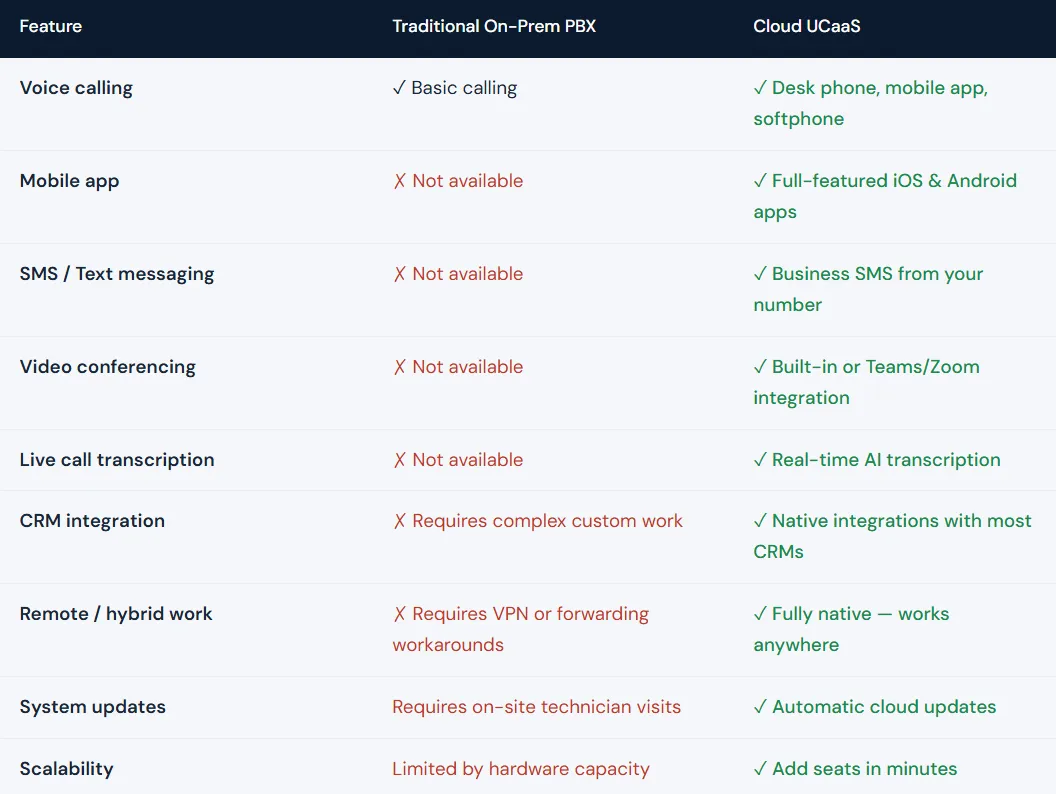
Features Businesses Find Most Rewarding
🎙️
Live Call Transcription
Instantly have calls and voicemails transcribed in real time with sentiment analysis and searchable history, saving time on notes and CRM entry.
📱
Business SMS
Send texts from your business number for follow-ups, reminders, and payment links, reaching the growing Gen Z workforce and customer base.
🏠
Remote Work Capabilities
Every user gets access to a full-featured business phone system experience no matter where they are — no VPN required, no call-forwarding kludges.
🔗
Teams & Zoom Integration
Already using Microsoft Teams or Zoom? Don't pay twice! TCI can add full voice and SMS capabilities directly into these tools your team already knows.

Step Five
Choose the Right Provider & Expert
With hundreds of cloud VoIP providers on the market, the difference between a smooth migration and a frustrating one often comes down to who you work with, not just which platform you choose.
TCI has partnered with over 50 of the top cloud providers and uses a consultative approach to match your specific business needs to the best platform for the best price. Our decades of industry experience means we've seen what goes wrong and how to prevent it.
We serve businesses across Virginia — from Virginia Beach and Norfolk to Richmond, Chesapeake, and Hampton Roads. Plus, Northeast North Carolina businesses — from Elizabeth City and Dare County to Currituck and Gates County. Our local team will handle everything from initial consultation through installation, migration support, and ongoing cloud support services so you always have someone who knows your system.
WHY WORK WITH A TECHNOLOGY PARTNER LIKE TCI
Rather than negotiating directly with a single cloud provider — who has every incentive to oversell you — working with a technology partner like TCI gives you access to 50+ platforms and saves you the time of looking with our independent guidance on what's right for your business, not what's most profitable for a cloud provider.

Step Six
Plan Your Transition
The final step is mapping out the actual migration — from number porting to training to cutover day. A well-planned transition is invisible to your customers and low-stress for your team.
Number porting
Your existing phone numbers can be ported to your new cloud system. This process typically takes 2–4 weeks and requires submitting a Letter of Authorization (LOA) to your new provider along with a recent carrier bill. TCI manages this process for you so nothing falls through the cracks.
Hardware cutover
If you're deploying new IP phones, they arrive pre-configured and ready to plug in. If employees are using softphones or mobile apps, setup is often as simple as downloading an app and logging in. A phased rollout — starting with one department or location — lets you resolve any issues before going company-wide.
Before Cutover Day
Submit number porting requests early
Configure auto-attendants and call flows
Set up voicemail greetings and ring groups
Distribute and test new devices or apps
Train all users on the new system
On Cutover Day
Have a technician on-site (or available remotely)
Port numbers during off-peak hours when possible
Test inbound and outbound calls from each location
Confirm voicemail, auto-attendant, and mobile apps work
Throw out the old phone & watch your employees become more productive
Frequently Asked Questions
How long does a cloud VoIP migration typically take?
For most small to mid-size businesses, the full process from discovery to cutover takes 4–8 weeks. The largest variable is number porting, which requires coordination with your existing carrier. Having your inventory and contract information ready upfront shortens this significantly.
Can I keep my existing phone numbers?
Yes. Phone number porting allows you to move your existing numbers to your new cloud system. This includes direct lines, toll-free numbers, and fax numbers. TCI handles the porting process and manages communication with your old carrier.
Will cloud VoIP cost more than what I'm paying now?
Most businesses pay roughly the same monthly cost as their current carrier bill, but they get significantly more features. When you factor in eliminated maintenance contracts, on-site system upgrades, and the added productivity from UCaaS features, the vast majority of businesses see a positive ROI within the first year.
What happens to my phones if my internet goes down?
Cloud VoIP platforms include failover options such as automatic call forwarding to mobile numbers, backup internet connections, or cellular failover. TCI configures these redundancy options during setup so your business stays reachable even during an outage.
Do I need to replace all of my existing phones?
Not necessarily. Many modern IP phones are compatible with cloud VoIP systems and can be reprogrammed to work with your new platform. Older analog phones may need an ATA adapter or replacement. TCI evaluates your existing hardware during the discovery process and recommends the most cost-effective path forward.
Is my data secure in a cloud phone system?
Business-grade UCaaS providers use enterprise-level encryption, SOC 2 compliance, and redundant data centers to protect your communications data. In many cases, cloud systems offer better security than on-premises systems that rely on older, unpatched hardware.
Connect
Email: [email protected]
O: 757.490.7733
DCJS 11-21176
Address: 2844 Crusader Circle, Suite 450,
Virginia Beach, VA 23453


