Spring Clean Your IT Environment with Managed IT Solutions
What Does a Managed IT Spring Cleaning Actually Include?
Every spring, millions of people do the same thing. They open the windows, pull everything out of the closets, throw away what's broken, organize what's worth keeping, and start fresh. The physical clutter that accumulated over winter gets dealt with methodically, completely, and with a clear sense of what belongs and what doesn't.
Your IT environment needs the exact same treatment, yet most businesses never give it one.
Outdated software sitting on machines nobody touches. User accounts for employees who no longer work there. Backup systems that were set up once and never tested. Devices running on borrowed time with no replacement plan. Security patches that are months behind. It accumulates quietly — the digital equivalent of junk in the garage — until something breaks, something gets breached, or an auditor asks a question nobody can answer.
March 31st is World Backup Day — a timely reminder that data protection isn't a one-time task, it's an ongoing discipline. And it's the perfect occasion to do something more comprehensive: a full IT spring clean. This guide walks Virginia businesses, law firms, healthcare practices, and multi-location organizations through exactly what that looks like — and what Managed IT services from TCI can do to make it a permanent state rather than an annual scramble.
Why IT Environments Get Cluttered (And Why It Matters)
IT clutter doesn't happen because anyone is careless. It happens because technology decisions are made continuously. A new hire gets a laptop, a new app gets adopted, a vendor gets added to the mix — and there's rarely a structured process for reviewing and retiring what's no longer needed.
Over time, the result looks like this:
•Devices running operating systems that are no longer supported or patched
•Software subscriptions being paid for tools that nobody uses
•Former employees' accounts still active in cloud platforms with live access credentials
•Backup jobs that run on a schedule but haven't been verified to actually restore correctly
•Network infrastructure — switches, firewalls, wireless access points — running firmware that's years out of date
•No documented inventory of what hardware exists, how old it is, or when it needs to be replaced
None of these items are catastrophic in isolation. Together, they create an environment that is more expensive to maintain, harder to secure, more likely to fail at an inconvenient moment, and increasingly difficult to recover from when something goes wrong.
IBM's Cost of a Data Breach Report found that organizations without proactive IT management and monitoring take an average of 277 days to identify and contain a breach — nearly an entire year of exposure before the problem is even understood.
277
Average days to identify a breach in organizations without proactive IT management — IBM Security
The Most Important Item on Your Spring Cleaning List: Backup & Disaster Recovery
If there is one area of your IT environment that deserves the deepest attention this spring, it is your backup and disaster recovery strategy. Not just whether you have one — but whether it actually works.
Most businesses have some form of data backup in place. Far fewer have tested it. And a backup that has never been tested is not a backup — it's a hope.
Backup vs. Business Continuity: Know the Difference
These two terms are often used interchangeably, but they describe fundamentally different things — and your organization needs both.
💾
Disaster Recovery (DR)
Disaster recovery is the process of restoring your data after a loss event — a ransomware attack, a hardware failure, an accidental deletion, a fire or a flood. DR backs up your data to a secondary location (cloud, offsite drive, or both) so it can be restored onto new or existing hardware when needed. The critical question isn't just whether you back up — it's how often, how completely, and how fast you can restore. Recovery Time Objective (RTO) and Recovery Point Objective (RPO) are the two metrics that define this: how long can your business tolerate being down, and how much data can you afford to lose?
🏢
Business Continuity (BC)
Business continuity goes a step further. What happens if your office is inaccessible due to a natural disaster? What if your primary server is physically destroyed? Business continuity planning ensures your operations can continue — at a reduced but functional level — while recovery is underway. This typically involves cloud-hosted systems that can spin up quickly, documented procedures for remote work, and tested runbooks that employees can actually follow under pressure. For Virginia businesses in coastal areas familiar with hurricane season, or any organization that cannot afford extended downtime, BC planning is not optional.
At TCI, we make a point of helping Managed IT clients understand the difference and design a BCDR strategy that matches their actual risk tolerance and operational requirements — not a generic template applied to every business the same way.
Today is World Backup Day — March 31st. The question to ask yourself right now: if your server went offline tonight, could you restore everything critical by tomorrow morning? If the answer isn't a confident yes, it's time to have that conversation.
The IT Spring Cleaning Checklist
Use this as your starting point for a Q2 IT audit. Work through each area honestly — and note anywhere the answer is "I'm not sure" as a priority for follow-up:
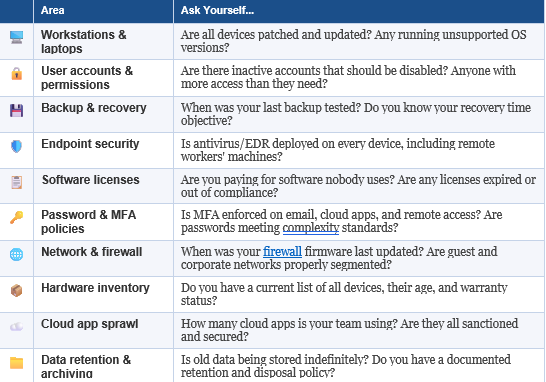
If you got through that list and found more "I'm not sure" answers than you're comfortable with, you're not alone. Most Virginia businesses don't have the internal bandwidth to stay on top of every one of these items continuously. That's exactly what Managed IT is designed to solve.
What Managed IT Actually Cleans Up — And Keeps Clean
Spring cleaning your home is satisfying but temporary. The clutter comes back. The same is true for IT — a one-time audit addresses what's there today, but the environment keeps changing. New devices get added. New users join and leave. New vulnerabilities get discovered. The only way to stay ahead of it is with a system that's always watching, always maintaining, always managing.
That's the fundamental value of Managed IT services. TCI's Managed IT offering covers every layer of the environment that accumulates problems when left unattended:
🖥️
Proactive Monitoring & Helpdesk Support
We monitor your entire environment — servers, workstations, network devices — around the clock, identifying issues before they become outages. When something needs attention, our helpdesk team responds within 20 minutes or less, triaging and resolving tickets so your team stays focused on their work instead of chasing IT problems.
🔧
Patch Management & Device Health
Every device in your environment gets regular, automated patch management — operating system updates, application patches, firmware updates — applied on a schedule that minimizes disruption and maximizes protection. We track the health and compliance status of every endpoint so nothing slips through the cracks.
💾
Backup & Disaster Recovery Management
We design, implement, and — critically — test your backup and recovery systems on a regular schedule. Not just set-and-forget backup jobs, but verified, documented recovery processes that we know work before you ever need them. And we help you understand your RTO and RPO so your backup strategy matches your actual business requirements.
📊
Lifecycle Management & IT Budgeting
One of the most underappreciated parts of managed IT is the budgeting and planning function. We maintain a complete inventory of your IT assets — every device, its age, warranty status, and software version — and help you plan and budget for replacements before equipment fails unexpectedly. No more surprise hardware purchases at the worst possible moment.
🛡️
Cybersecurity & Compliance
TCI brings a full cybersecurity stack to every Managed IT client — endpoint detection and response, email security, multi-factor authentication management, security awareness training, and compliance support for HIPAA, PCI, FTC Safeguards, CMMC, and other mandates affecting Virginia businesses. Security isn't an add-on. It's built into every layer of how we manage your environment.
What IT Spring Cleaning Looks Like for Your Organization
General SMBs
For Virginia small businesses, the most common spring cleaning discoveries are inactive user accounts, outdated devices without replacement plans, and backup systems that have never been tested. A structured IT audit with TCI surfaces all of these in a single engagement — and our custom Managed IT plans let you address them at a pace and price point that fits your business, without the forced minimum commitments other providers impose.
Law Firms & Professional Services
Virginia law firms carry a heightened responsibility around data protection and access control. Client files, matter records, and communication archives are sensitive assets that require documented backup, verified recovery processes, and strict access controls. An IT spring clean for a law firm includes auditing who has access to what, ensuring matter data is being backed up correctly, and verifying that the firm's communication and document management systems meet confidentiality standards.
Healthcare Practices
For Virginia medical offices and healthcare facilities, spring cleaning intersects directly with HIPAA compliance. Patient record systems, billing platforms, and communication tools all require documented backup and recovery procedures, access logging, and endpoint security. A Managed IT provider with healthcare experience — like TCI — helps practices stay compliant year-round, not just when an audit or incident forces the issue.
Multi-Location Businesses
For Virginia organizations operating across multiple offices, the IT spring cleaning challenge is compounded by scale. Each location may have its own mix of devices, network configurations, and local IT habits. A managed services approach standardizes the environment across all sites — consistent patching, consistent backup, consistent security — and gives leadership a single view of the health of the entire organization's IT, regardless of location.
Don't Let Another Quarter Start With a Cluttered IT Environment
Spring is a natural reset. It's the moment when the calendar turns, Q2 begins, and there's an opportunity to start fresh with a cleaner, better-organized foundation. Most businesses take advantage of that energy for their physical spaces. The ones that extend it to their technology environment start Q2 in a fundamentally stronger position — more secure, more resilient, and more prepared for whatever comes next.
TCI works with Virginia businesses, law firms, healthcare practices, and multi-location organizations to design and manage IT environments that don't require an annual scramble to clean up. Our custom Managed IT plans are built around what your business actually needs — with proactive monitoring, real backup and recovery, and the strategic guidance to keep your technology running the way your organization depends on it to.
This World Backup Day, don't just make a note to check your backups. Let's make sure they actually work — and build a plan so you never have to wonder again.
Ready to Spring Clean Your IT for Good?
Schedule a free Managed IT consultation with TCI. We'll audit your current environment, identify the gaps, and walk you through a custom Managed IT plan built around what your business actually needs — no minimums, no fluff, no pressure.
